Custom Assets
You can define your own custom asset types as GameResources. They give you a nice inspector window and they're hotloaded in-game, which means you can whip things up pretty quickly if you're using them.
You can define your own custom asset types as GameResources. They give you a nice inspector window and they're hotloaded in-game, which means you can whip things up pretty quickly if you're using them.
Creating a custom asset type
You can find plenty of examples of assets throughout s&box, here's a snippet from a clothing asset:
// Custom Asset named "Clothing Definition" with the extension ".clothing"
[AssetType( Name = "Clothing Definition", Extension = "clothing", Category = "citizen" )]
public partial class Clothing : GameResource
{
public string Title { get; set; }
[ResourceType( "vmdl" )]
public string Model { get; set; }
[Hide]
public int Amount { get; set; }
[JsonIgnore]
public int MySecretNumber => 10;
protected override Bitmap CreateAssetTypeIcon( int width, int height )
{
return CreateSimpleAssetTypeIcon( "checkroom", width, height, "#fdea60", "black" );
}
}
It is important to note:
- You should ensure that your filetype is all lowercase and less than or equal to 8 characters, otherwise it will fail to register/save
- These are just JSON files with pretty faces and file types easy for the game to locate (and for developers to work with)
Creating a new Asset for your GameResource
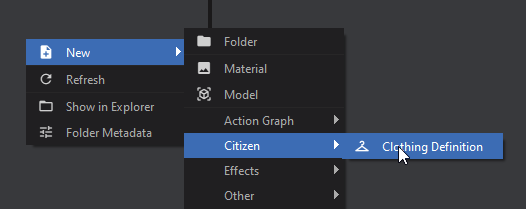
Now that you've created the GameResource class, it should automatically be added to the "New" menu in the Asset Browser. If you didn't specify a Category, then it will show under "Other".
Accessing Assets
All assets are loaded when you first start the game, and there are several ways you can access them:
ResourceLibrary.Get
// Load the resource from a path
// If the asset isn't found, this returns null
Clothing = ResourceLibrary.Get<Clothing>( "config/tshirt.clothing" );
ResourceLibrary.TryGet
// Serves a similar purpose to Get<T> but returns a bool indicating
// whether the resource could be found. If the resource was found,
// the method provides it through an `out` parameter.
if( ResourceLibrary.TryGet<Clothing>( "config/tshirt.clothing", out var loadedClothing ) )
{
Clothing = loadedClothing;
}
else
{
// Resource couldn't be found, handle that here...
}
PostLoad
When assets are loaded they call their PostLoad method. You can use this to store a list of your assets.
public partial class Clothing : GameResource
{
// Access these statically with Clothing.All
public static IReadOnlyList<Clothing> All => _all;
internal static List<Clothing> _all = new();
protected override void PostLoad()
{
base.PostLoad();
// Since you are constructing the list yourself, you could add your own logic here
// to create lists for All, AllHats, AllShirts, AllShoes, ect.
if ( !_all.Contains( this ) )
_all.Add( this );
}
}
Attributes
You can use any of the Attributes you'd normally use on Properties (just like Components)